The pipeline
Drag each deal from stage to stage until you win it or lose it.
Drag a card from column to column to move a deal along. A deal is a sales opportunity with a title, a value and a stage, and the pipeline is the board where you see all of them.
The board
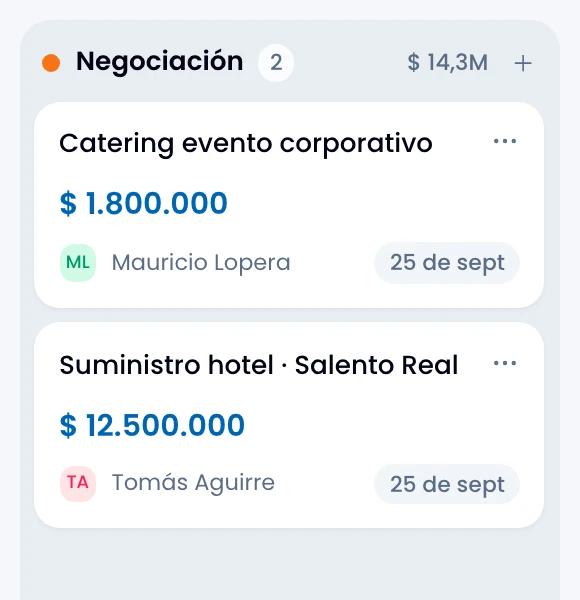
Read a card at a glance: the title, the value in its own currency, the contact or company, the source and, when it has one, the expected close date. The board opens one column per stage.

Each column carries at the top how many deals it holds and what they add up to.
Creating a deal
Create a deal by three routes:
- The New deal button on the board.
- Create deal from a conversation. The deal is tied to that conversation and inherits the contact.
- A contact record.
In all three, Wrap stores where the contact came from, source and detail, as a snapshot. If the contact's source changes later, the deal keeps the one it had. That way the revenue-by-source report does not rewrite itself.
Filters and views
Filter the board by six axes from the filter menu: stage, owner (including "me" and "no owner"), status, source, minimum value and expected close. The last two take a custom range as well as the presets.
Save a combination you use often as a view, private or shared with the team, from that same menu. See Saved views.
Winning and losing
Move a deal to the Won or Lost stage to close it.
On losing, Wrap asks you for the reason: pick one from the list or type it. That reason feeds the lost-reasons report.
On winning from the deal's own record, if the contact is not marked as Customer, Wrap offers to do that.
Archiving
Archive a deal to take it off the board without losing it. You can still open it, and Wrap keeps its history.
Exporting
Export what you are looking at to CSV, with the filters applied.