The inbox
WhatsApp, Instagram, email and web forms in one queue, with filters and statuses.
Handle everything a customer writes from the inbox, whatever route it comes in by: each message arrives here as a conversation. Wrap lives on this screen.
The two columns
Pick a conversation from the list and answer it without changing screens: you have its history and the composer right beside it.
Click the avatar in the header to see who the customer is, without leaving the conversation.
On small screens you work with one at a time and navigate between the list and the conversation.
The inbox counter
Check the number on the Inbox row in the sidebar: those are the conversations holding an unanswered customer message.
Do not confuse it with the bell's count. The bell says "something happened" and this one says "customers are waiting". Prioritise your day by this one.
The filters
Narrow the list with one of the four quick views: All, Mine, Unread and Urgent. Only one is on at a time.
- Mine: assigned to you.
- Unread: the ones holding customer messages nobody has opened.
- Urgent: in the last quarter of its window, and anything already past it. See The response target.
Wrap puts a coloured dot on Mine, Unread and Urgent when there is something inside.
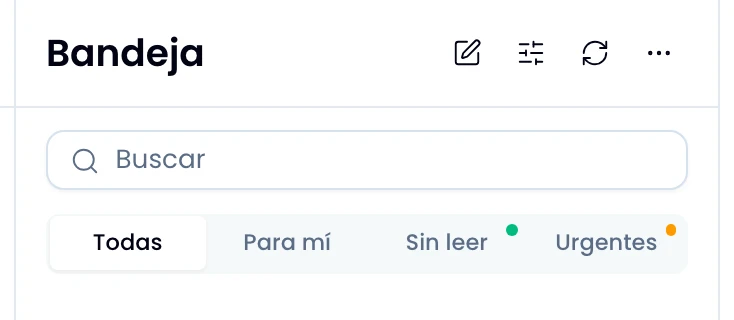
Open the Filters menu to combine several axes at once. Filter by status, between open, snoozed and closed. Filter by assignment, anyone or unassigned. Filter by channel, by type and by account. And switch the view between all, archived and excluded.
Wrap adds the axes up instead of letting one overwrite another. Each axis you turn on lands as a chip under the search box, and one click removes it.
When you have follow-ups due today, hit For today: Wrap floats those conversations to the top of the list and the button carries the count.
Bookmark the link or send it to someone: the filters live in the URL.
If you do not see Urgent, set a response target for your workspace first.
Conversation statuses
Change a conversation's status according to what you still owe it:
| Status | What it means |
|---|---|
| Open | It is alive and counts towards the backlog. |
| Snoozed | You put it aside. It comes back on its own, or when the customer writes. |
| Closed | Finished. A message from the customer reopens it. |
| Archived | Out of the inbox. It reappears if the customer writes. |
| Excluded | Wrap discards further messages on that thread as they arrive. |
Exclude the threads that are not customer service: automated notifications, internal chains, email that slipped in. You can undo it whenever you want.
If you do not see the exclude option, ask an admin of your workspace to do it.
What a row shows
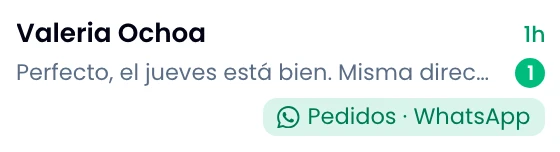
Read a row to know who you are talking to and how recent the last message is. Wrap puts the contact's name, or their email or phone when there is no name on file. It adds the time of the last message, and the status pill when it is not open.
Wrap gives you the message ahead of time in the preview, with the unread count. If the last message was yours, it marks with a tick how far it got: sending, sent, delivered, read or failed.
Wrap finishes each row with the channel's label in its colour, the For today pill and the attachment count when there is one.
To find out who it is assigned to or whether it is running late, filter by Urgent or open the conversation and read its header.
One signal Wrap adds on its own
Serve the angry customer first: Wrap analyses customer sentiment and puts a coloured dot beside the name. It marks only an unhappy and a happy customer.
Wrap changes nothing by itself with that signal. Use it to order who you attend to.
Sent and drafts
Open Sent and Drafts from the sidebar.
Go into Sent to see who you wrote to without getting an answer. Wrap filters the inbox there down to conversations that have messages and none inbound, so it is not a folder of its own.
The moment the customer answers, that conversation leaves Sent and appears in the inbox.
Pick up in Drafts the half-written new messages, which are yours alone. See Drafts and scheduled sends.