Business hours
The days and times the team answers, and WhatsApp's auto-reply outside them.
Set the days and times your team answers, and the WhatsApp auto-reply sends the "we are closed right now" notice to whoever writes outside them. The schedule covers the whole workspace and you set it once, in Wrap's settings.
Read this before you switch anything on: a workspace with no schedule configured counts as always outside hours.
What you configure
Press Edit beside the schedule summary and set the week in the panel. Wrap saves nothing until you press Save there.
Keep Turn hours on enabled so the schedule counts. Switch it off and save, and Wrap drops the days you had set and your workspace ends up with no schedule, which is the trap this page opens with.
Set From and To on each day you open, and switch off the days you close with the switch on the row. Clicking the day's name also turns it on and off. A day you switch off reads Closed and drops its hours: turn it back on and it starts again at 09:00 to 17:00.
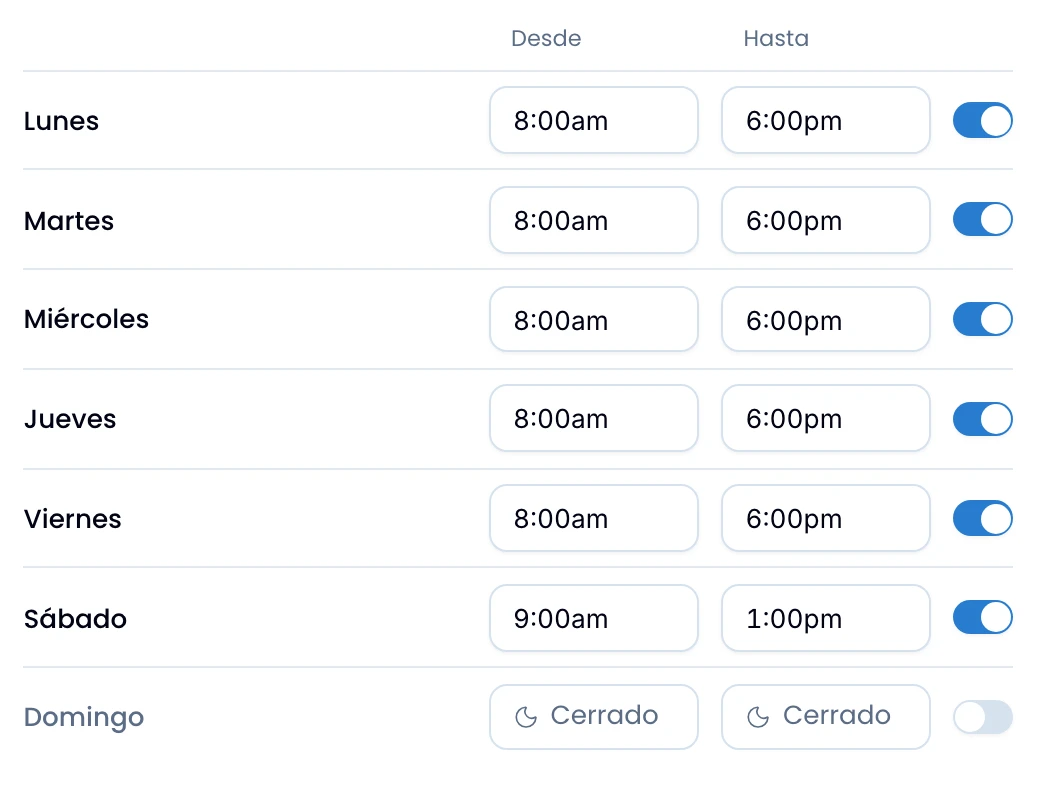
Type the hour however it comes out: 7, 730, 7pm. Or pick it off the list, which steps every fifteen minutes. If you type something Wrap cannot read, the time goes back to its previous value, so check it after typing.
Each person sees the times in the format they chose in their own account, 17:00 or 5:00pm. The schedule is one value for the whole team, and the only thing that changes from person to person is how it reads.
Wrap reads everything in the workspace time zone, and shows it beside the schedule. The zone belongs to the workspace: change it in Nest. See Wrap's workspace settings.
Close each window on the same day it opens. Nothing stops you typing 22:00 to 02:00, but a day whose To is earlier than its From never counts as open: it stays closed around the clock. Split an overnight shift across the two days.
The auto-reply
Turn the auto-reply on channel by channel, and only on WhatsApp channels: they are the only type that has it.
It needs two things: to be switched on, and to have an approved WhatsApp template chosen, with its language. The template can't have variables, because Wrap sends it as is, with nothing filled in. Without a template there is no auto-reply: outside the 24-hour window, a template is the only thing WhatsApp lets you send.
When it fires
Wrap sends the notice when these five conditions hold at once:
- The channel is WhatsApp.
- The current time is outside the workspace's hours.
- The channel has the reply enabled and a template chosen.
- The conversation is not excluded.
- Wrap has not already sent an auto-reply on this conversation since a person last replied.
If a customer wrote outside hours and got no notice, run back through the five.
The trap, in detail
Switch the auto-reply on for a channel but never set the hours, and every inbound conversation gets told you are closed.
With no hours set, the workspace summary reads No schedule · 24/7 coverage, and that holds as long as the auto-reply is off on every channel. With it on, a blank schedule sends the closed notice at every hour.
For 24/7 coverage, leave the auto-reply off rather than leaving the schedule blank.
"First reply only" is not "once ever"
Reply in the thread yourself and the counter goes back to zero: Wrap resets it when a person answers in that conversation. So the customer gets the notice once per cycle, not once in their life. They write today, somebody answers, they write again at night next week, and they get the notice again.
The notice says "we are not here right now", and that has become true again.
If the send fails
If Meta rejects the notice, for instance because the template is not approved, the customer does not get it and the conversation keeps working normally. Check that the template chosen on the channel is approved.