Guests and RSVP
Adding people to an event, answering Yes/Maybe/No, and what happens to an occurrence you decline.
Inviting people
Add people to the event you organize from the Guests field in its editor: search for them in the workspace and they join the list. Each chip carries their name and their answer, and reads Not responded until they reply. To take somebody off the event, remove them from their chip.
Whoever comes off the event stops seeing it on their calendar, and Swarm tells them by bell and by email. On a repeating event they get one notice for the whole series, not one per date.
Guests on a single occurrence
Change one date's guest list without touching the rest of the series. On a series occurrence, save the Guests field and pick the scope: This event only, This and following events or All events. With This event only, the list changes for that date alone and the rest of the series keeps its own.
The person you remove from that occurrence stops seeing it on their grid and gets a cancellation notice. The person you add sees that date appear on their grid, with an invitation for it, and answers Yes, Maybe or No exactly like any other event.
Responding
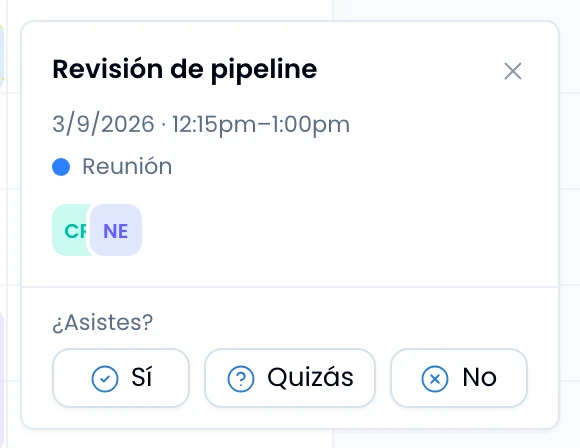
Answer an invitation from the event's peek preview: Yes, Maybe or No, under the question Attending?. Swarm keeps the one you picked marked. On a series occurrence, Swarm asks next whether your answer applies to Just this one or The whole series.
The invited-event marker
Tell at a glance which events you organize: the ones you were invited to and do not organize carry a dashed left edge. Swarm marks them that way on the grid block, on the all-day tray chip, on the month chip, and on the agenda row.
A declined occurrence
Decline an occurrence and it disappears from your own grid, never from the organizer's.
Notifications
Swarm alerts you through the bell at every moment of a shared event:
- Someone invited you to an event.
- Someone responded to an event you organize.
- The time changed on an event you are on.
- An event you are on was cancelled.
Emails
Invites, time changes and cancellations also arrive by email. The invite, a
change that affects the whole series, and a cancellation carry the event
attached (.ics), and your mail client adds it directly. When the invite or
the cancellation is for a single occurrence, the attachment carries that
occurrence and not the whole series.
Control these emails apart from the bell's with Calendar emails, on Nest's Account page.