Swarm settings
Change what is yours in Personal, what is the workspace's in Workspace, and find where everything else lives.
Who can use this? Anyone with access to Swarm changes what is theirs in Personal. The Workspace section asks you to be a Swarm admin.
Tune Swarm from the last two sections of the sidebar. In Personal you decide what is yours, and in Workspace you change what applies to the whole workspace.
Personal
Open Calendar, which leads to My calendar, and set your working hours. Those hours dim the out-of-range hours on your calendar and decide how much of the day the grid draws when you open a booking page. See Calendar settings.
Workspace
Go into Calendar to set what applies across the workspace: week start, an event's default duration, the working hours inherited by anyone who has not set their own, the automatic reminder, and public booking. See Calendar settings.
Workspace, the second entry, gathers channel creation and artificial intelligence, the two sections below. From there, Open the workspace in Nest takes you to the workspace name, its members and billing.
If you need something here changed and you do not see it, ask somebody who is a Swarm admin.
Channel creation
Decide who creates public channels and who creates private ones, separately. Pick Anyone in Swarm or Administrators only for each.
Anyone can join a public channel, so one too many costs little. A private channel creates a room nobody else can see, and that is the one worth restricting first.
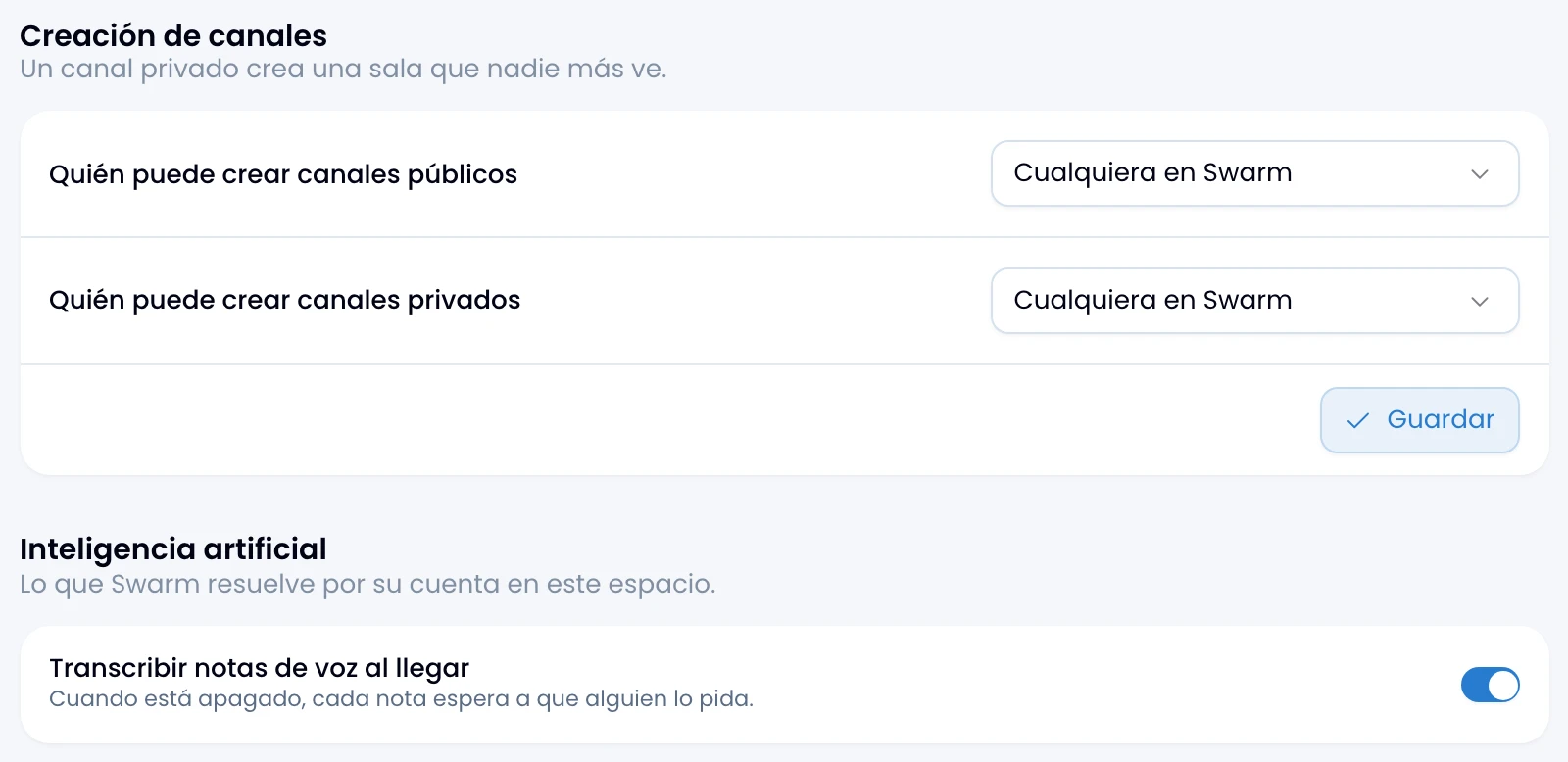
Artificial intelligence
Swarm transcribes every voice note on arrival. Turn Transcribe voice notes on arrival off and each person decides which note to transcribe, with the button the note carries.
Transcription spends credits from the workspace's AI pool. See Voice notes.
Where everything else is
Look here for what does not live in these two sections:
| What you are looking for | Where it is |
|---|---|
| Your own working hours | Personal › Calendar |
| Week start and an event's duration | Workspace › Calendar |
| The working hours people inherit | Workspace › Calendar |
| The automatic reminder on events | Workspace › Calendar |
| Public booking pages | Workspace › Calendar |
| Light, dark or system theme | The user menu, at the bottom of the app rail |
| Marking yourself active or away | The same user menu |
| Name, photo, time zone | Your profile, in Nest |
| Language, theme, time format | Account, in Nest |
| Which channels alerts reach you on | Account, in Nest |
| Sound, desktop and push | The cog on the app rail |
| The sidebar's shape | The same cog |
| How much each channel alerts you | The channel itself |
| Workspace name, members, billing | Nest |
The user menu is about the person, and that person is the same in all five apps. The cog is about this browser and this app: switching sound, system notifications or push on in Swarm does not switch them on in Wrap.