Account
Email, password, theme, language, time format, and which channel each app's alerts reach you on.
Change your email and your password, adjust how the suite looks, and decide which channel each app reaches you on.
Change your account address when you stop using an email. You sign in and recover your password with that address, so you confirm the change from your inbox.
Password
Type the new password twice, with a minimum of 8 characters. Nest rejects the ones that are too short and tells you when the two do not match, before sending anything.
Interface
Pick the theme (light, the system's or dark), the language (Spanish or English) and the time format (am/pm or 24-hour).
The language changes the whole suite's interface, not just Nest's. What it does not change is the content your team wrote: channel names, notes and messages keep the language they were written in.
The time format applies across the suite: you see 1:00pm or 13:00. Everyone
picks their own, so the same meeting appears in the format of whoever is looking
at it.
You also change the theme from the user menu.
Notifications
Tick how you want each app to reach you, among the channels that app offers:
| App | In app | Push | |
|---|---|---|---|
| Nest | Yes | Yes | – |
| Wrap | Yes | Yes | – |
| Swarm | Yes | Yes | Yes |
| Flow | Yes | – | – |
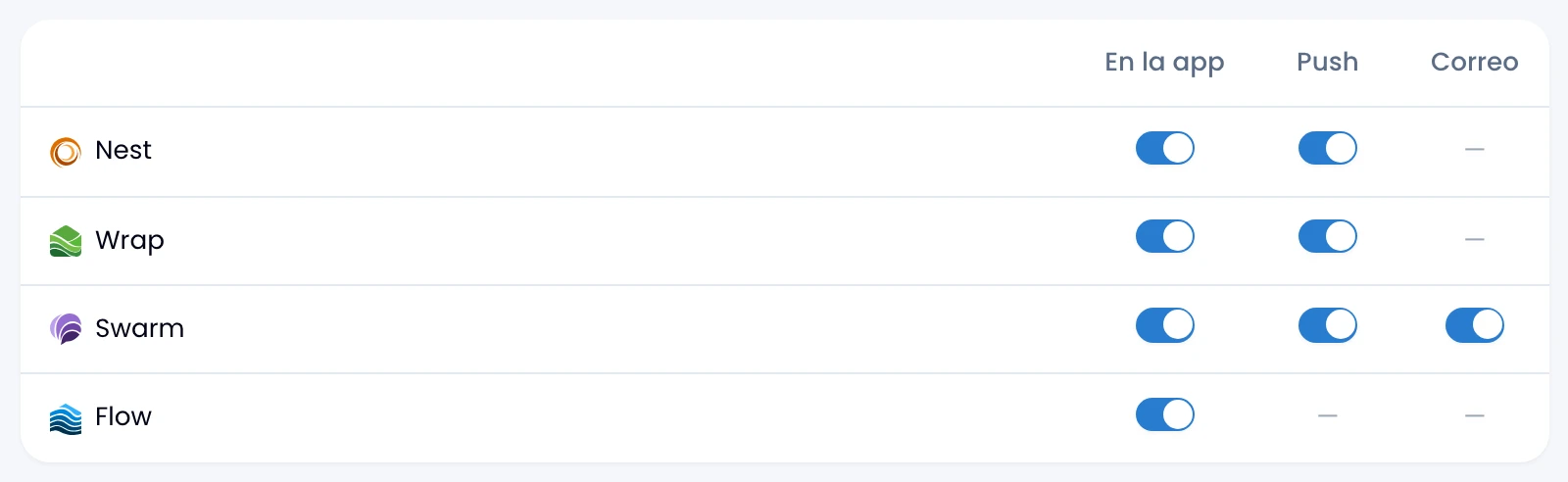
By email, Swarm sends you its due-date digest and its calendar emails.
Your preferences are personal and apply across all your workspaces.
Calendar (Swarm)
Tune Swarm's calendar emails separately, with two switches of their own:
- Calendar emails: event invites, time changes and cancellations. On by default.
- Reminder emails: an email when a reminder you set on an event is about to come due. Off by default: turn it on if you want the alert in your inbox too, not only the bell or push.
If you turn off Swarm's email in the table, both of these stop reaching you, whatever you leave them on.
What is remembered on its own
Collapse the sidebar or group the menu and Nest leaves it that way for next time. It saves three things as you work:
- Whether the sidebar is open or collapsed.
- Which sidebar sections you left open.
- Whether the menu appears in full or grouped into categories.
They are personal too and apply across all your workspaces. Wrap keeps its own, so you can leave one sidebar collapsed and the other open.