The AI assistant
Ask plain-language questions about your workspace data, inside Wrap and Swarm.
Ask the Wrap and Swarm assistant about what is in your workspace, in plain language. It is not a general chatbot: it only knows your data, and only the parts you can see.
Open the box with ⌘/ from any screen, or from the first row of the sidebar:
Ask Wrap, Ask Swarm.
What you can ask
Ask what you would otherwise answer by opening three screens:
- "How many conversations have gone unanswered since yesterday?"
- "Which deals have been sitting in proposal for more than two weeks?"
- "Who wrote to me this week and never got a reply?"
- "Summarise the support channel over the last three days."
The answer comes back in blocks: text, tables and linked record lists. Jump from there to the record you care about.
It answers only with the data in your workspace, and only the parts your permissions let you see: it never invents what is not there. The box does not write, in either app. It only looks things up and answers: it creates nothing, edits nothing and deletes nothing in your workspace.
Where it does propose changes
Apply the assistant's proposals on the Suggestions strip, inside a Wrap conversation. Save the email or the phone the customer just gave, link a company, open a deal or move it along a stage. Moving a stage touches the pipeline, so it goes through a confirmation dialog on top of that.
Conversation memory
Chain your questions: the assistant remembers the last 25 within one workspace, the same ones you see in the panel. Past that, the assistant summarises what slides off the top rather than forgetting it outright, so "and of those, which are in Bogotá?" keeps working long afterwards.
Open the assistant on another device and you land in the same thread, with no need to give the context again.
Credits and the pool
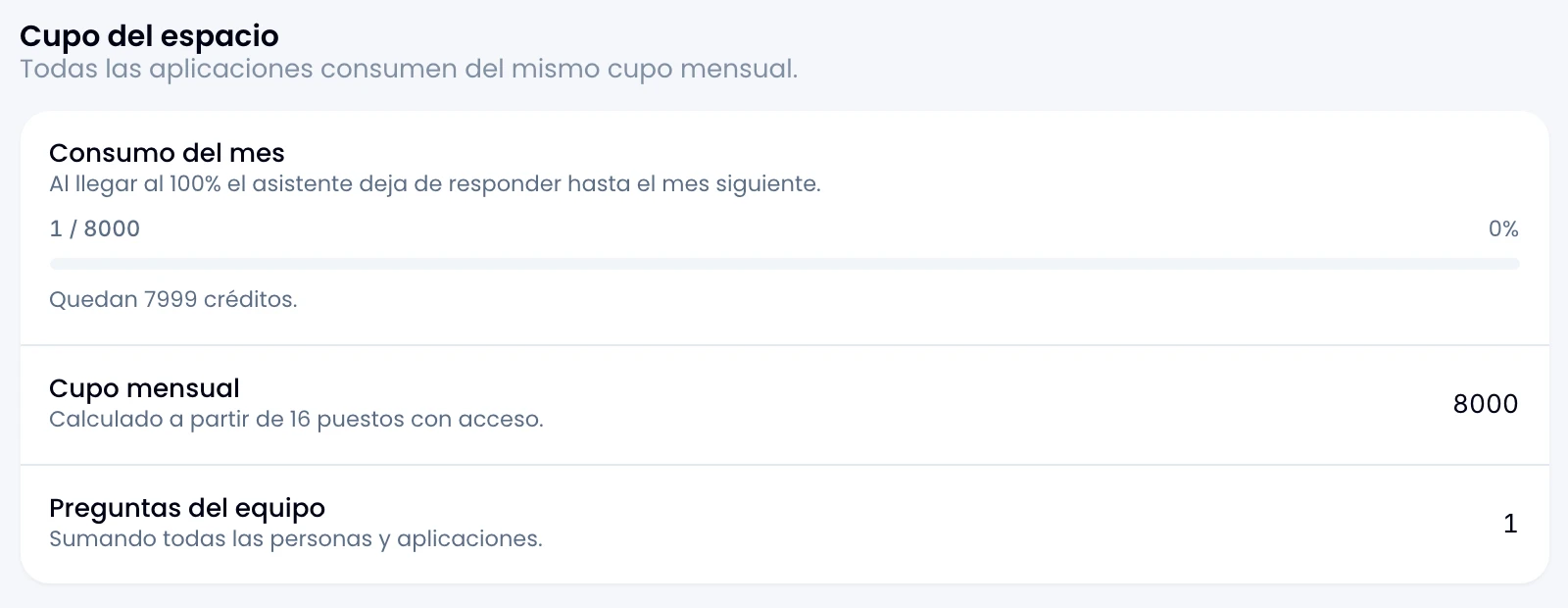
Every question spends credits. One credit is one US cent, and a typical question costs between 1 and 5.
- The pool belongs to the workspace, not to you. There is no per-person cap.
- Each seat adds 500 credits a month, and what counts is seats, not people: somebody with access to Wrap and Swarm counts twice, because they can also ask in two boxes.
- At 100% the assistant stops answering across every app until next month.
See your own usage under Personal → AI usage. If you administer the workspace, open Workspace → AI usage to see all of it, person by person and app by app.